The numbers behind a land deal: a worked example
 LandOSCalculator · Training example
A purchase price and a resale guess are not a deal analysis. The useful question is what remains after the costs you have counted, and which important costs or facts are still missing.
Here is a fictional example you can change in the land deal calculator. These are training figures from our education materials, not Allegan County sale data, a customer result, or a forecast.
Start with the entered costs
Imagine a five-acre parcel with a $12,000 purchase assumption. The exercise includes four other amounts:
| Item | Hypothetical amount |
|---|---|
| Purchase | $12,000 |
| Acquisition closing costs | $600 |
| Total holding costs | $400 |
| Preparation or improvements | $500 |
| Selling costs | $1,500 |
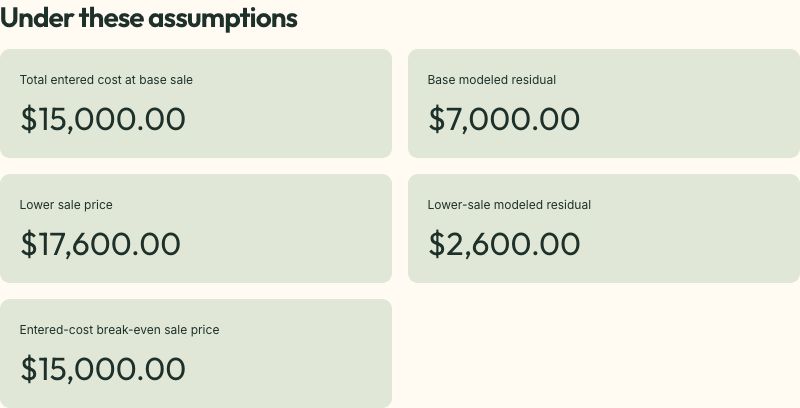
| Total entered cost | $15,000 |
The holding amount is a total, not a monthly figure. No holding duration is established in this example. The preparation amount does not represent a quote or permission to do any work.
A hypothetical $22,000 sale leaves $7,000 after those entered costs. Call that the modeled residual. It is the money left in this calculation, before anything omitted. Calling it take-home profit would hide too much.
Lower the sale price
Reduce the sale assumption by 20%, from $22,000 to $17,600. Keep the entered costs unchanged.
The residual falls to $2,600. The sale price fell by $4,400, and so did the residual. There is no cushion created by calling the first number conservative.
Now add $2,000 for extra investigation and holding costs. The lower-sale case leaves $600. At a $14,000 sale and the original $15,000 cost, the result is a $1,000 loss.
These scenarios show sensitivity. They do not establish how likely any outcome is.
LandOSCalculator · Training exampleSeparate a missing cost from a zero cost
Before using your own numbers, ask what belongs in the model:
- Title, closing, legal, survey, and investigation fees.
- Taxes, assessments, insurance, maintenance, and holding costs.
- Financing interest and fees, if applicable.
- Work needed to prepare the property for the intended buyer.
- Listing, brokerage, marketing, and sale closing costs.
- A contingency for costs you cannot quote precisely.
Avoid counting the same expense in two categories. Do not enter zero because you have not investigated an item. Income taxes and your own labor also affect the business even though this simple calculator does not compute them.
The calculator lets you enter fixed selling costs separately from a fee based on sale price. The break-even sale price adjusts for that percentage. It still depends entirely on the costs you include.
A positive result does not settle access or use
In the training example, access and zoning remain unresolved. The parcel stays Hold for evidence even when the subtraction produces $7,000.
That is the most useful lesson in the exercise. You cannot use a larger margin to answer whether the planned use is possible. First establish the evidence. Then decide whether the supported numbers justify the next step.
LandOSMap · Parcel boundaries
Try this with one parcel
Write a source beside every real price and cost input. Mark whether it is a completed transaction, a written quote, an estimate, or still unknown. Run a lower-sale scenario and a higher-cost scenario separately so you can see what changed.
Finish with a sentence: “Under these assumptions, the modeled residual is [amount], and the largest unresolved issue is [question].”
Keep that calculation with the parcel research and follow-up work in LandOS.
Next: Research a parcel in Allegan County.
LandOSLists · Organize your research